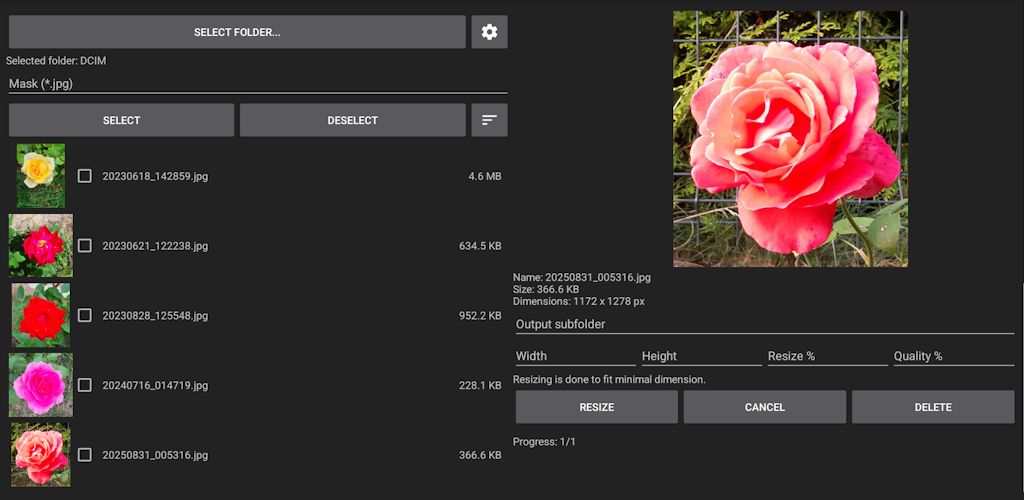
Offline Photo Resizer lets you resize, fit, crop and convert photos completely offline. Resize a single image or batch of photos by width, height or percentage, adjust image quality, fit images to a background of any size and color, and save results in your preferred format and subfolder. Everything works without upload to internet, so your photos stay private on your device.
You can quickly resize photos or images by pixels or percentage, reduce image size for e-mail, messaging or social media, and keep control over quality. Batch resize and format conversion makes it easy to process many photos at once, so you don't have to edit each image manually.
When you need to fit photos to a specific background size, the app can place your image on a background of chosen dimensions and color. This is useful for preparing images for posts, covers or layouts that require exact width and height. You can also apply the same fit settings to multiple images with batch fit.
The software supports templates of parameters, so you can save them and reuse later.
The built-in crop tool lets you crop photos or images with a live preview, so you see the result before saving.
A color picker is available whenever you need to choose a background color. Pick an exact color for the background used when fitting images, so your resized or fitted photos match your design or theme. Background color also can be selected from palette or entered using RGB or HSV color scheme.
You can convert image formats while resizing or fitting. Save images in their original format or convert them to JPG, PNG or WEBP. Batch convert lets you change the format of many images at once, for example converting selected PNG files to JPG or WEBP. Files can be selected either manually or using mask.
Resized and converted images can be saved in the original folder or in a specified subfolder, so your original photos remain untouched and your processed images stay organized. You can also choose whether to keep the original format or always save in your preferred format.
The app includes a flexible files list view: view files as plain text or as text with thumbnail images. You can sort photos using a chosen criterion, making it easier to find and process the images you need.
When you are done, you can share selected photos directly from the app or delete processed images you no longer need, keeping your storage clean.
The app allows to select desired user interface language.
This software is provided "as is" without any warranties of any kind, expressed or implied. The authors assume no responsibility or liability for any damages, data loss, or other consequences resulting from its use. By using this software, you acknowledge and agree that you alone are responsible for any outcomes arising from its use.
This software itself does not collect, store or share any personal data. It may display advertisements through Google AdMob, so for Google's privacy and advertising policies check https://policies.google.com/technologies/ads
https://play.google.com/store/apps/details?id=com.diproltu.photoresizer